Duplicate File Cleaner Pro
Intelligent duplicate file management & space recovery solution.
Duplicate File Cleaner Pro scans your drives for identical files, photo copies, duplicate videos, audio, and documents so you can safely recover gigabytes of wasted storage.
Engineered for absolute accuracy.
Designed specifically for Windows power users who need reliable drive organization without guesswork.
Lightning-fast duplicate scanning across local drives
Smart duplicate detection with accurate MD5/SHA-256 hash matching
Image, audio, video, and document duplicate comparison
Custom folder selection & protected system folder exclusion
Safe deletion with instant preview before deleting
Duplicate grouping with smart selection rules (keep oldest/newest/largest)
Real-time space recovery tracking & scan progress monitoring
One-click Undo Last Recycle action safeguard
Four steps to a clean, fast drive.
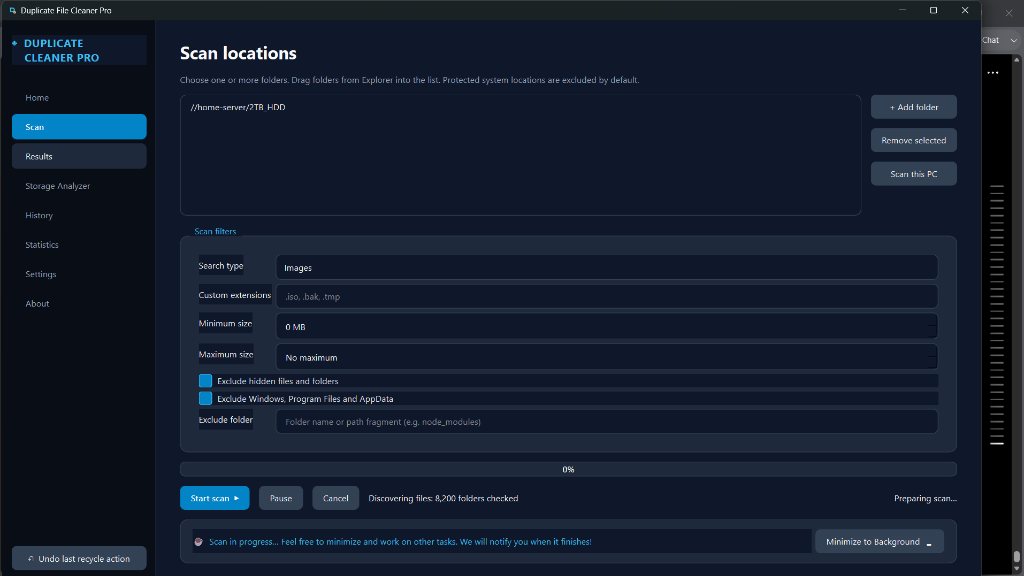
Select Locations & Filters
Drag and drop any local folder, external drive, or network share into the scan list. Exclude system paths automatically or specify custom file extensions (.iso, .bak, .tmp).
Intelligent Multi-Thread Scan
Our engine analyzes files using byte-by-byte comparison and cryptographic MD5/SHA-256 hashes to group exact duplicates in seconds.
Preview & Smart Auto-Selection
Inspect duplicate sets side-by-side with full media previews. Apply 1-click rules like "Keep Oldest", "Keep Newest", or "Keep Largest".
Safe Cleanup & Undo Safeguard
Clean selected duplicate copies safely. Files move to your Windows Recycle Bin with an integrated "Undo Last Recycle" safeguard for total peace of mind.
Before & After Duplicate Cleaning
Drag slider to compare drive health before and after running Duplicate File Cleaner Pro.
Drive space cluttered with redundant files
- 45.2 GB of duplicate photo albums & videos
- 12,400+ redundant document copies
- Sluggish file index & search performance
45.2 GB recovered instantly to your PC
- 45.2 GB free space restored for new files
- Single master copy protected per file group
- Lightning fast local search & organized library
Why users trust Duplicate File Cleaner Pro
Explore the interface
Click any screenshot preview to expand and view in full detail.
Installation & Setup Guide
Instant Download
After server-verified payment, download the lightweight executable directly.
Run Standalone
No complex setup wizard required. Launch the standalone application on your PC.
Recover Space
Select target drive folders, click scan, and enjoy gigabytes of free disk space.
User Feedback & Reviews
“I had 3 photo drive backups with thousands of duplicate RAW photos. Duplicate File Cleaner Pro recovered 68 GB in under 5 minutes without missing a beat.”
Vikram S.
Digital Photographer
“The hashing scan is unbelievably fast and accurate. I love that Windows system folders are excluded by default so I never worry about breaking my OS.”
Ananya R.
Software Engineer
“Extremely clean UI with zero bloatware or background subscription model. One-time purchase, instant download link, works offline right away.”
Rohan M.
Content Creator
Frequently Asked Questions
Is Duplicate File Cleaner Pro safe to use on my drive?
Yes! Protected system locations like Windows, Program Files, and AppData are excluded by default, and original files are protected while giving you full preview control.
How does it match duplicate files accurately?
It uses intelligent file hash signatures and byte-by-byte comparison to guarantee 100% accurate matching, preventing false positives.
Can I undo a file deletion?
Yes. Deleted files are safely sent to your Windows Recycle Bin, and the app features an integrated Undo Last Recycle Action control.
Can I scan external hard drives or NAS folders?
Yes. You can add any local or mapped network drive folder to your custom scan list.